
MEET YOUR EVERYDAY SCANNER · V1.0

Scan it.
Create it.
Keep it simple.

From a Wi-Fi password to your next big idea. Scan QR codes and barcodes offline, create your own, and keep the useful things close.
Works offline No account needed On-device scanning
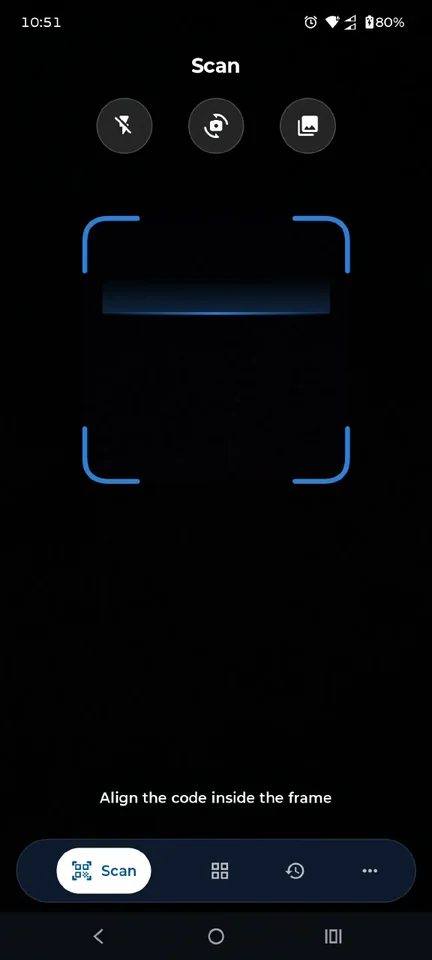
QR Code Scanner camera screen with automatic scan area
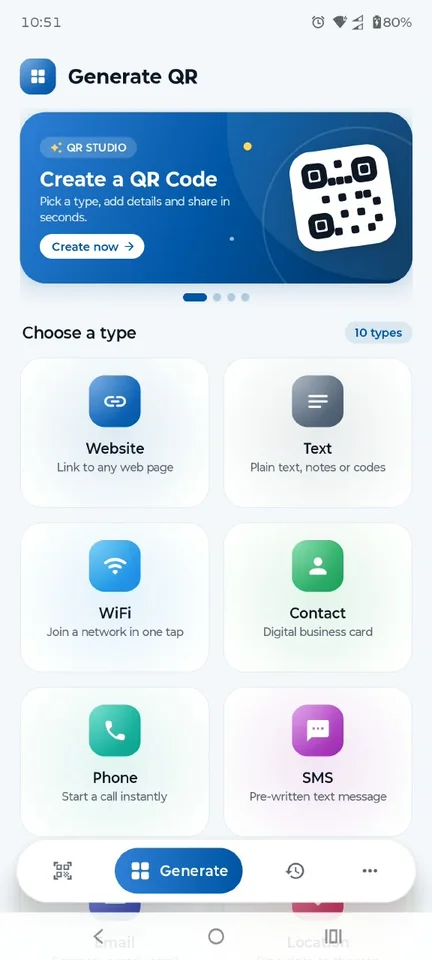
QR Code Scanner create screen with a choice of QR code types
No signal? No problem.Scan and create offline.
Your codes stay yours.Stored right on your phone.

QR & Barcode Scanner: Create · Actual app screens

27formats & variants
10QR code types to create
4 × 7frame styles × colors
Offlinescanning & creation
Small app. Everyday possibilities.

One place for
all things QR.

Read it, act on it, make it your own. Everything you need to get more out of the codes around you.

Scan just about anything.

From a product barcode to a Wi-Fi QR code. Point your camera, or pick a photo. No scan button needed.

Scanning features

Make it yours.

Turn a link, a contact, or a good idea into a QR code. Add a frame and a little color. Then share it.

Creation features

Keep the useful things.

Find that link again, save a favorite, or take your history with you using CSV export and import.

History features
Camera scanning screen with scan controls
Point. Read. Ready.Automatic code detection.
From code to done

Less tapping.
More getting on
with your day.

A menu at the table. A label on a package. A network at a friend’s place. Start with a scan and take the next step.

01 /

Point your camera

Keep the code in the frame. Or choose an image from your gallery.

02 /

Get the details

Read links, contact details, text, and more right on your phone.

03 /

Make your next move

Open a website, join Wi-Fi, save a contact, or copy just what you need.

Discover one-tap actions
A code with character

A little personality.
A lot of possibilities.

A coffee shop’s Wi-Fi. Your next event. Your social profile. Give your code a frame that feels like you.

01   Choose a frame
02   Pick a color
03   Say something
Explore all 10 QR types
Try a frame · live style preview
Example QR code linking to example.comSCAN ME

Illustrative style preview. This example code always links to example.com. Create your own in the app.

Privacy, kept simple

Your phone.
Your codes.
Your choice.

No sign-up to slow you down. Scanning and creation happen on your device, and your history stays there.

Read our privacy approach

Processed on your device

Code contents aren’t uploaded for scanning or QR creation.

A history you control

Keep your scans locally, export them when needed, or turn history off.

Preferences that are yours

Manage optional usage statistics, crash reports, and notifications in Settings.

A closer look

Feels familiar.
Does a little more.

Clean screens. Thoughtful details. A comfortable experience on small phones, large phones, and tablets.

Actual app screenshots. Appearance may vary by device and version. Select an image for a closer look.

App screenshot

App scanner
Good questions

A few things you might
be wondering.

Does scanning work without internet?
Yes. The app reads QR codes and barcodes on your phone, and QR creation also works offline. Opening a website, completing a payment, sending an email, or using another online service may still need a connection.
What can I turn into a QR code?
Choose from 10 types: website, text, Wi-Fi, contact card, phone, SMS, email, location, payment link, and social profile. Enter the details, generate the code, and save or share it.
Where is my scan history stored?
Your scans and created codes are saved locally on your phone when history is enabled. You can search the list and mark useful items as favorites. The app does not upload your scan history for cloud syncing.
Do I need an account?
No. There is no account or sign-up requirement for scanning or creating codes. Your scan and creation activity stays on your device unless you choose to share or export it.

Your next scan. Made simple.

Offline scanning. Personal QR codes. Everything in one place.